


Top 10 Project Management Software Solutions for Architects
Project‑management software now saves the average employee ≈ 498 hours a year—more than twelve 40‑hour work‑weeks, according to multiple 2024–25 studies. Firms that use a dedicated PM platform are also 66 % more likely to stay on budget than those that rely on spreadsheets and email alone.
Below are the top 10 project management software solutions for architects in 2025. We evaluated each product on architecture‑specific features, ease of use, integrations and verified customer feedback. Nutcache leads the field, but every solution has clear strengths (and limits) so you can choose what fits your practice best.
Quick‑view comparison
| Rang | Software | Best for | Starting point* | Key integration |
|---|---|---|---|---|
| 1 | Nutcache | All‑in‑one project management | Free / 15.95$ per user per month | Zapier, QuickBooks |
| 2 | Deltek Ajera | Accounting and project management combined | On request | Revit, Power BI |
| 3 | BQE Core | Professional services automation at scale | 29 $ user per month | QuickBooks, Xero |
| 4 | Total Synergy | Real‑time financial visibility l | Business and Enterprise plans (quote required) | Xero, QuickBooks, API |
| 5 | Monograph | Design‑oriented budgeting | 25 $ / month | Slack, QuickBooks |
| 6 | Factor AE | Small and medium‑sized architecture and engineering firms | 30 $ per user per month | QuickBooks Online |
| 7 | CMap | Unified project cost and customer relationship management | 16 £ per user per month | Microsoft 365, BIM |
| 8 | Runn | Capacity planning and what‑if scenarios | Free (five users or fewer) / 10$ per user per month | Google SSO, API |
| 9 | Newforma Konekt | Project information management and Building Information Modeling issue tracking | On request | Revit, ACC |
| 10 | Pluriell (Milient) | French‑Norwegian all‑in‑one suite | On request | Zapier, Microsoft 365 |
*Prices in USD/GBP billed annually unless noted.
Why architects need specialist tools
Complex, multidisciplinary teams: Sustainable‑design consultants, mechanical, electrical and plumbing engineers (MEP), and building information modeling coordinators (BIM) all need a single, reliable source of truth.
Regulatory pressure: As of 2025, many RFPs demand carbon‑intensity reports and embodied‑energy calculations.
Remote & hybrid work: 61 % of project professionals now work at least one day a week off‑site—mobile‑first PM is no longer optional.
Client transparency: Owner‑rep firms increasingly expect live dashboards rather than PDF status reports.
Software reviews
1 | Nutcache – Editor’s Choice
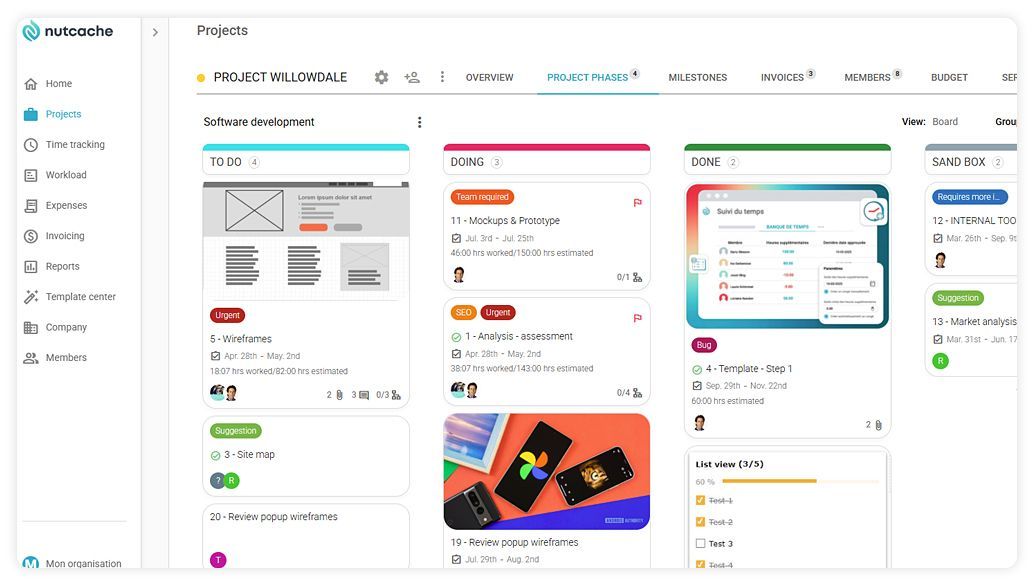
Nutcache is an all‑in‑one application built for architects and engineers, covering everything from the initial quote to final invoicing. Its Kanban boards mirror the American Institute of Architects (AIA) phases, while real‑time dashboards track hours and budgets.
You can view workload by project phase and assign resources to:
- SD – Schematic Design
- DD – Design Development
- CD – Construction Documents
- CA – Construction Administration
The platform also automates budget alerts when a critical threshold is reached. Its intuitive interface and integrations with tools like Zapier and QuickBooks keep mixed or remote teams running smoothly.
Key features
- Phase‑based boards (Schematic Design → Construction Documents → Construction Administration)
- Robust time tracking + live budget bar
- Multi‑client invoicing by phase (fixed‑fee, hourly, hybrid)
- Read‑only client portal with comments
Pricing
- Free (up to 2 users)
- Pro: $15.95 US / user / month (annual)
- Enterprise: $25.95 US / user / month (annual)
- Custom plan: on request
Pros
- Free for micro‑studios
- Budget alerts via email
- All‑in‑one solution
- Granular task management
Cons
- Limited third‑party integrations
- Summary reports: basic and not detailed
2 | Deltek Ajera – Combined Accounting & PM
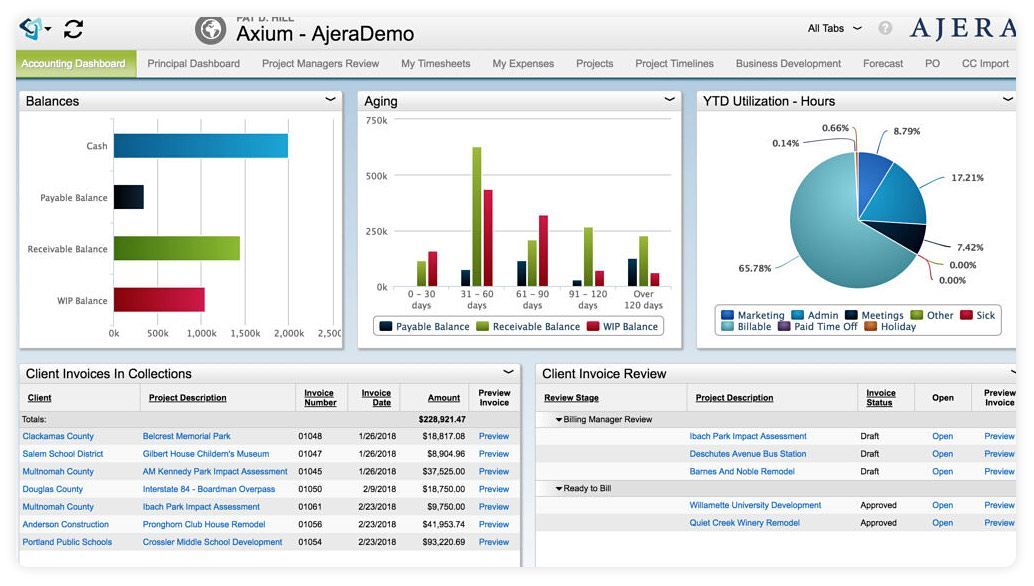
Deltek Ajera brings together scheduling, resource planning and a full general ledger, delivering clear insight into margins and cash flow.
Key features
- Work‑in‑progress, accounts receivable and utilization dashboards
- Timesheets connected to payroll
- Phase‑based cost‑to‑completion forecasting
- Milestone / %‑complete automated invoicing
- Simulated staffing charts
Pricing
- Quote‑based pricing negotiated by users or firm revenue
Pros
- Deep accounting for architecture & engineering (A&E) firms
- Heat maps for staff workload
Cons
- Long ERP‑style implementation
- Heavy interface for casual users
3 | BQE Core – All‑in‑One PSA Suite
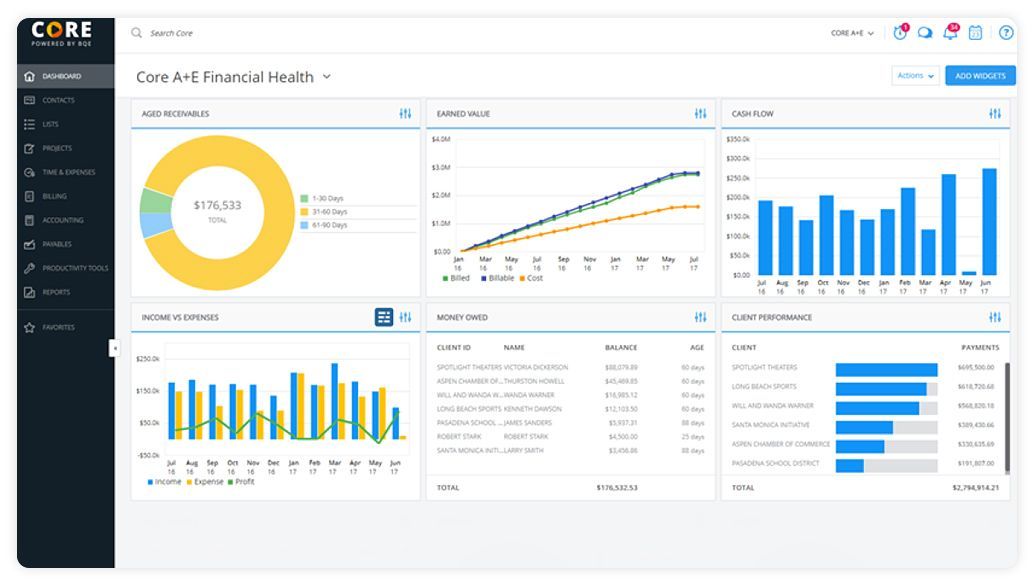
BQE Core rolls time tracking, expenses, accounting and business‑intelligence (BI) dashboards into one platform. It supports phase‑based contracts for A&E firms.
Key features
- 50+ widgets (gauges, tables, charts)
- Custom invoice templates
- Mobile receipt scanning
- Built‑in leave management
- Two‑way sync with QuickBooks / Xero
Pricing
- About $29 /user/month
Pros
- Powerful dashboards
- Automatic KPI emails
Cons
- Dense interface for beginners
- Limited mobile edition
- Higher pricing
4 | Total Synergy – Real‑Time Financial Visibility
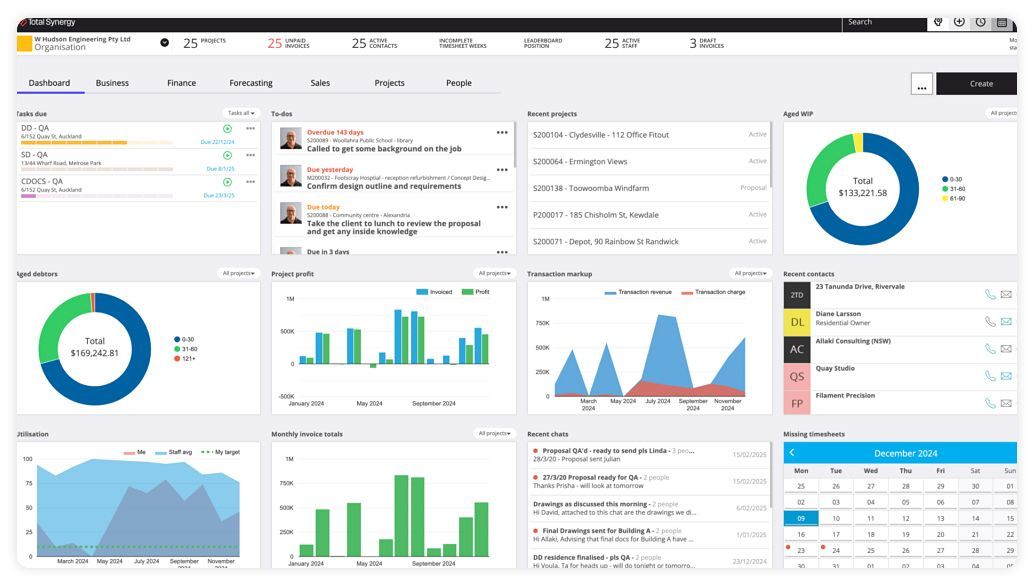
Built for the architecture, engineering and construction (AEC) sector, Total Synergy offers a comprehensive financial dashboard: budgets, work‑in‑progress (WIP), forecasts and resource planning.
Key features
- Customizable project phases and revenue templates
- Cash‑flow forecasts and profit margins
- Gantt planning and resource allocation
- Xero, QuickBooks connectors and open API
Pricing
- Business & Enterprise plans –quote only
Pros
- Strong financial dashboards
- Optional HR and project‑information‑management (PIM) modules
Cons
- Dense interface
- Non‑public pricing
5 | Monograph – Design‑Led Budgeting
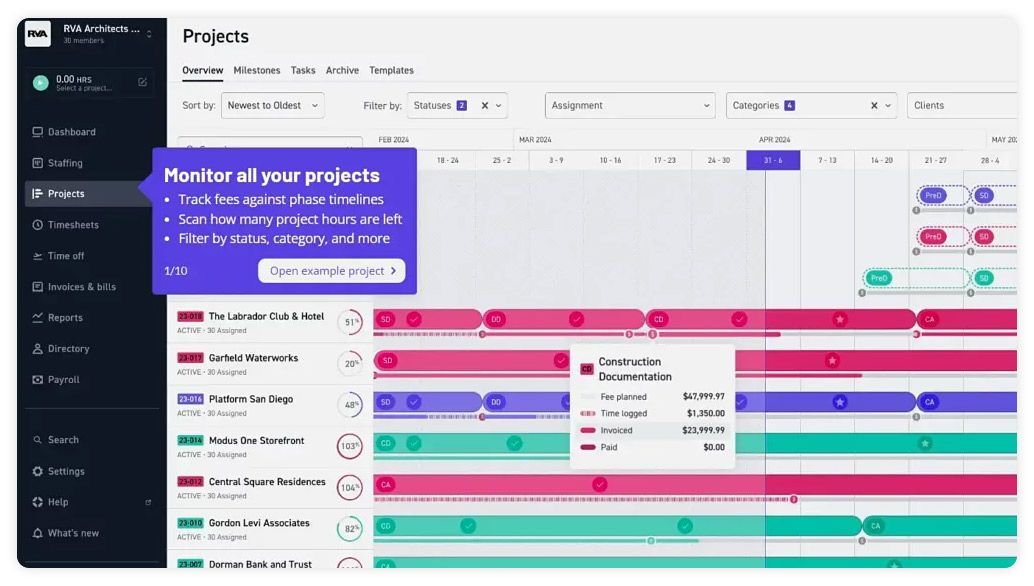
Created “by architects for architects,” Monograph revolves around the MoneyGantt, a single bar showing time, fees and progress.
Key features
- MoneyGantt bars
- Auto‑generated timesheets
- Revenue and staffing forecasts
- Slack + QuickBooks integrations
Pricing
- $25 – $490 US / month (annual), depending on team size; all features on every plan
Pros
- Low learning curve
- AI‑driven budget suggestions
Cons
- API in beta
- Limited multi‑office planning
- High pricing
6 | Factor AE – Streamlined Ops
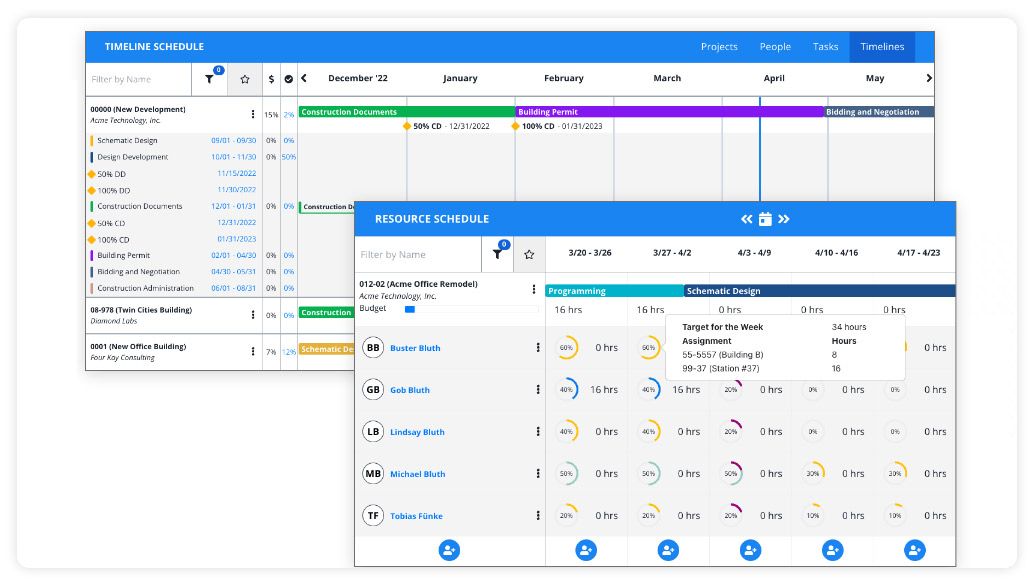
Factor simplifies planning, time capture and invoicing with guided onboarding.
Key features
- Resource planning & allocation
- Real‑time project‑margin KPIs
- Fixed‑fee/time billing
- QuickBooks Online integration
Pricing
- $30 US / user / month (annual)
Pros
- Transparent pricing
- Fast setup
Cons
- Limited advanced customization
- No BIM modules
- No budgeting
7 | CMap – Unified CRM + Project Costing
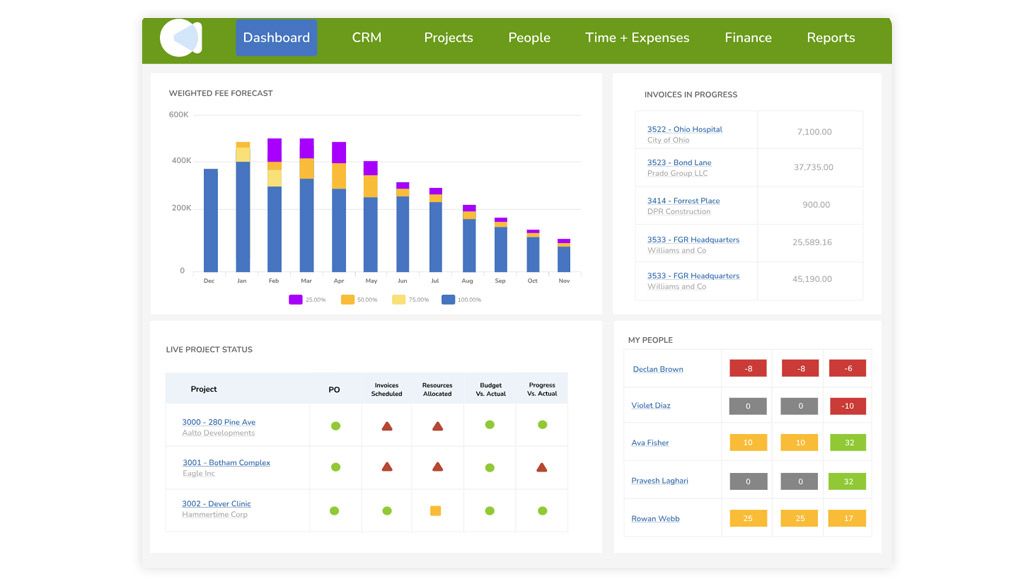
CMap links business development, customer‑relationship management (CRM) and project execution for an end‑to‑end workflow from bid to billing.
Key features
- Sales & quoting pipeline
- Resource and finance planning
- Project profit reporting
- Microsoft 365 integrations
Pricing
- “PIM” plan (project‑information management): £16 /user/month (example)
- “Enterprise” plan: on request
Pros
- Complete workflow from sales to billing
- Strong uptake in the AEC sector in the UK and US
Cons
- Complex sterling pricing structure
- BIM modules only as add‑ons
8 | Runn – Visual Capacity Planning
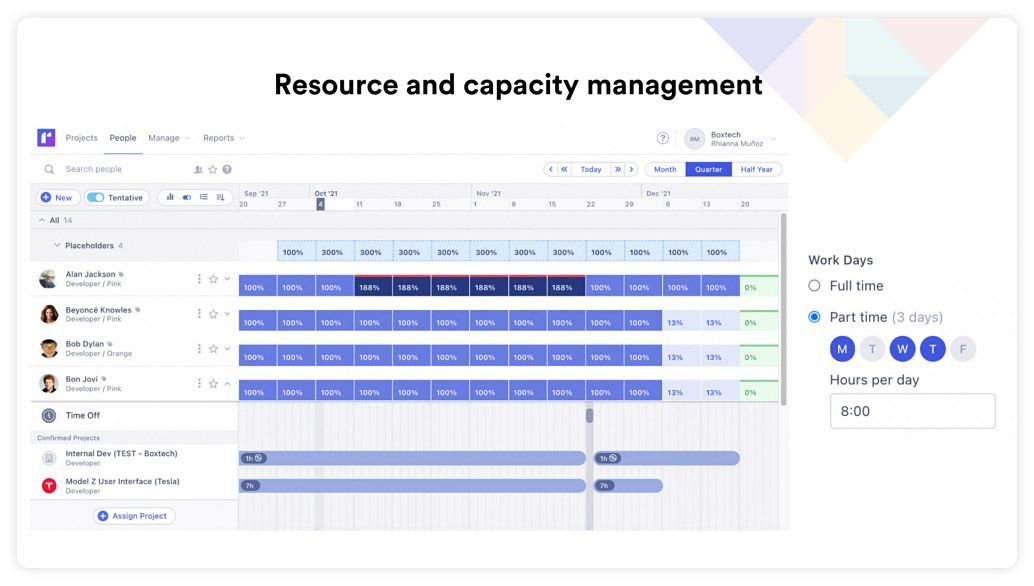
Runn excels at capacity management and what‑if scenario modeling.
Key features
- Drag‑and‑drop scheduling
- Scenario simulations and financial forecasts
- Lightweight timesheets
- API + SOC 2 security compliance
Pricing
- Free for up to 5 users
- Pro: $10 US / user / month
- Enterprise: quote only
Pros
- Intuitive interface
- Generous free tier
Cons
- No native invoicing
- Focuses solely on capacity
- Missing features
9 | Newforma Konekt – Document Control & BIM Issues
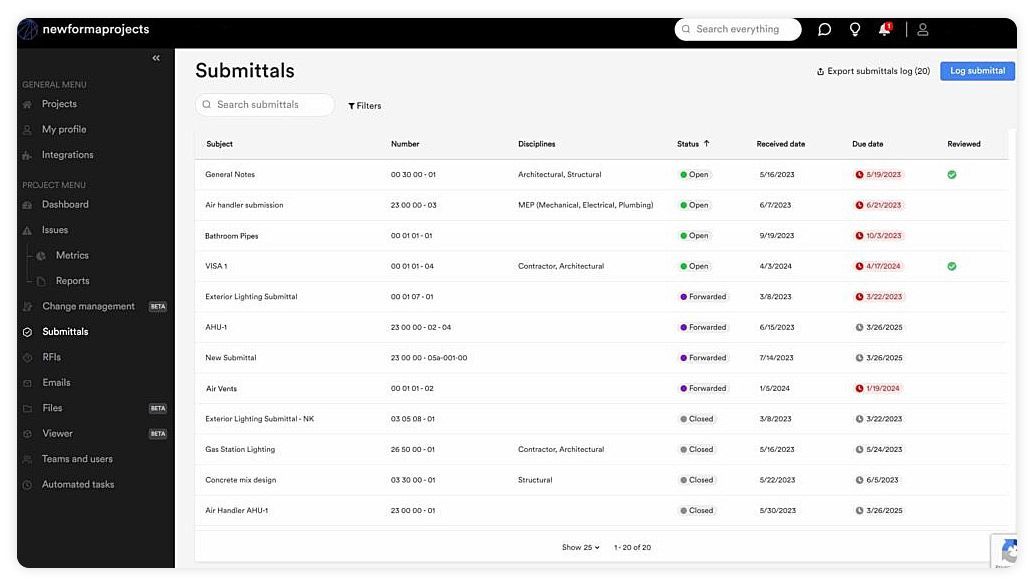
Konekt combines Newforma’s document management with issue tracking for building information modeling (BIM). It offers an audited, version‑controlled register, a 2D/3D viewer (Revit and IFC) with in‑model annotations, and full‑text search across emails and PDFs to locate a drawing or RFI quickly.
Key features
- Version‑controlled, audited document register
- 2D/3D viewer with spatial annotation tools
- Virtual sets without file duplication
- Integrations with Microsoft Outlook, SharePoint and Autodesk Construction Cloud
- Full‑text search across emails and PDFs
Pricing
- On request; tiered plans, non‑public pricing
Pros
- Prevents plan‑version confusion
- Contextual BIM issue tracking
Cons
- Requires a primary PM tool for scheduling
- Opaque pricing
10 | Pluriell (Milient) – Franco‑Norwegian All‑in‑One Platform
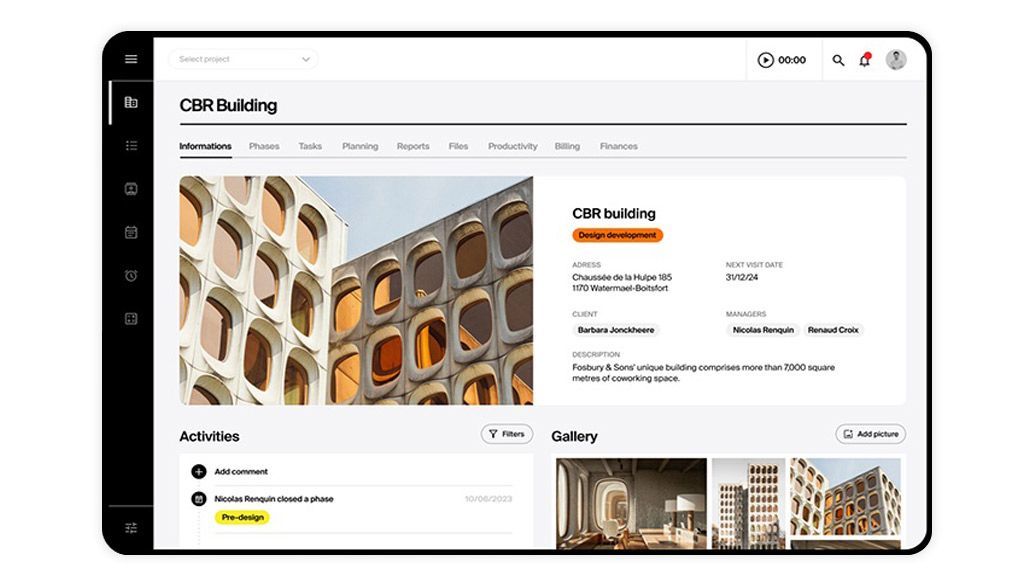
Part of the Milient suite, Pluriell combines project management, time tracking, finances and site reports in a bilingual interface (FR/EN). Designed for Europe but now available in North America, it tracks cash flow by progress and provides margin indicators per phase.
Key features
- Time tracking and progressive invoicing
- Workload planning and cash‑flow forecasts
- Mobile site reports (photos, annotations)
- Exportable KPI report library
- Zapier, Microsoft 365 integrations
Pricing
- On request (demo required)
Pros
- Modern, fast interface
- Integrated finance and field modules
Cons
- Limited North‑American presence
- Non‑public pricing and mainly European support
Summary
- Nutcache remains the versatile choice for small‑ to mid‑sized firms.
- Deltek Ajera and BQE Core suit practices needing a full ERP suite, though they’re heavier to use.
- Total Synergy and Factor AE stand out for financial transparency.
- Newforma Konekt acts as an advanced BIM complement.
- Pluriell offers an integrated French‑language alternative, but its North‑American footprint is still emerging.
Frequently Asked Questions
What makes project‑management software “architecture‑specific”?
BIM/CAD integrations, phase‑based structure, plan‑version control, phase‑based billing.
Does a small studio really need this kind of tool?
Even a two‑person practice benefits from accurate timesheets and centralized drawings—especially when collaborating.
How much training is required?
Nutcache, Monograph and Monday.com deploy in under a week. ERP‑style systems (Ajera, BQE) take 3–6 weeks.
Can one of these tools replace Revit?
No—Revit/Archicad are modeling applications. PM tools handle planning, budgeting and collaboration. Prioritize integration rather than replacement.